Streamlit allows users to create interactive Python-based web apps, making it easier for non-technical users to interact with insights generated by Python code without having to interact with code files or - depending on how the app is eventually deployed - without having Python installed on their machine.
Below is an example of a Streamlit interface created to allow users to run a discrete event simulation model, where they can change parameters and rerun the simulation without ever changing the parameter in a script.
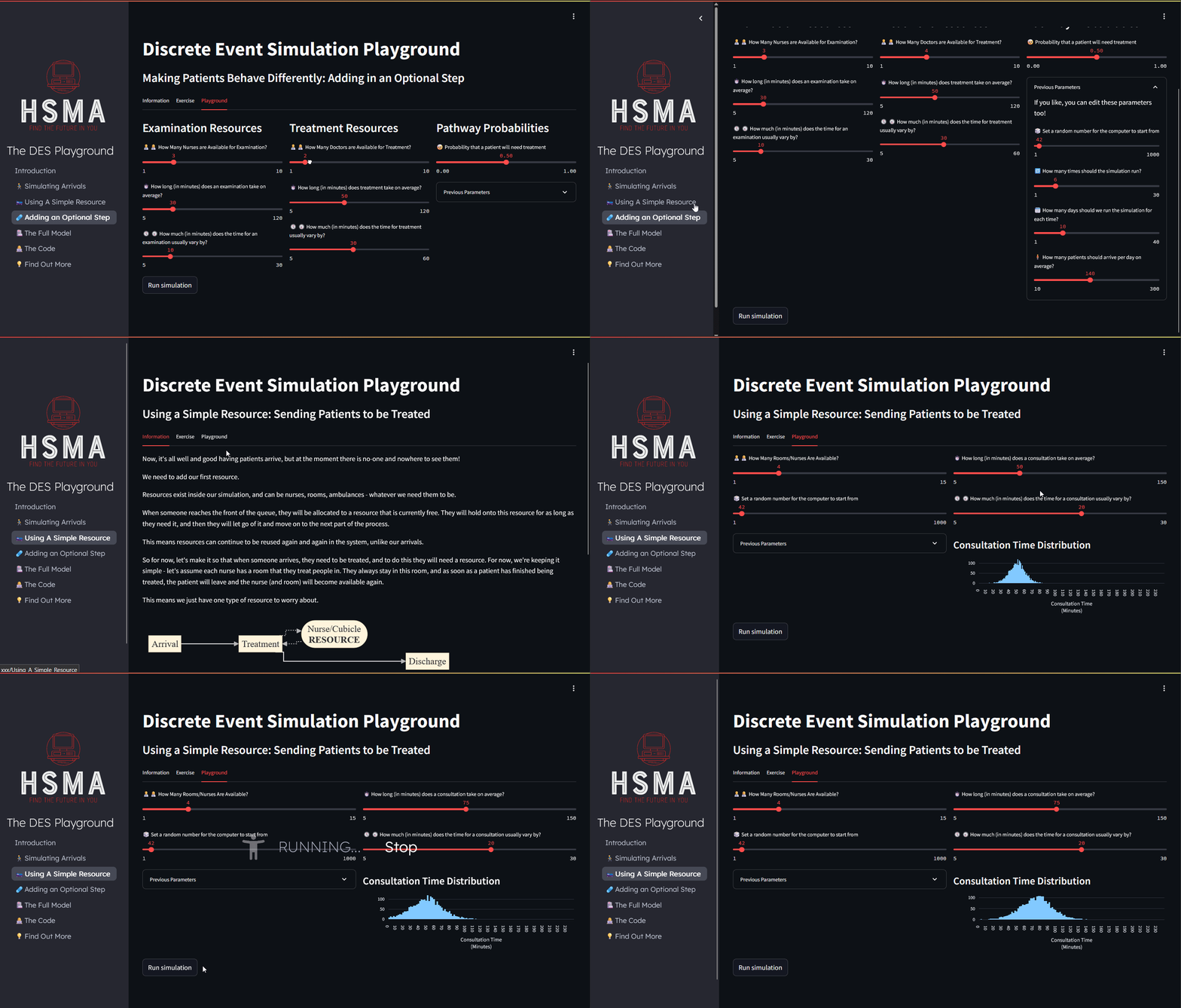
With even relatively complex apps achievable with only Python code, simple top-to-bottom execution of code by default, and inbuilt support for common data analysis outputs like interactive dataframes, static and interactive plots, and maps, it’s a powerful but beginner friendly tool that also can be used for complex apps with its advanced state management and rerun control features.
Resources for Learning
The HSMA programme devotes two sessions to teaching how to use Streamlit, building up from the absolute basics to more complex multipage apps and an example front end for a discrete event simulation app.
Session recordings can be found on the HSMA modules page: https://www.hsma.co.uk/modules
The interactive teach yourself eBook from the HSMA programme can be found at https://webapps.hsma.co.uk
Deployment
Streamlit apps can be run locally on the machine of a user with Python installed, allowing for the creation of an easier-to-use interface for certain tasks. This is usually achieved by downloading/cloning the GitHub repository where the app is stored, installing the relevant environment, and running the app with a command like streamlit run app.py, which should be detailed in the repository readme.
In these cases, all processing will happen on the machine of the user running the app.
It’s important to consider the security of any Streamlit app you download from GitHub - or any script in general!
While it’s not practical or necessary to review every line of code you ever use - for example, you woudn’t be expected to check every line in a pandas or matplotlib function before running it - you should consider whether undertaking some review of code is sensible. A large library that’s been thoroughly reviewed by the wider open source community? Risks are very low. But while it’s very rare, it is possible for a malicious actor to write commands into the code that would send data from the memory of an app - such as uploaded data or database credentials - to an external location. For smaller apps, scripts or libraries, you should consider some review of the code for any obvious potentially unsafe code.
In particular, keep an eye out for the use of libraries like requests, urllib, smtp, sqlite, socket, subprocess or shutil. While these may be used entirely legitimately - e.g. to request publicly held data from a website or an API, or to undertake necessary filesystem operations for accessing and saving data locally - you should review any use of these libraries and make sure you understand what they are doing.
Cloud
Various free options for cloud-based deployment of Streamlit apps exist. This can be a strong option for apps using publicly accessible data, sufficiently aggregated data, and other data that has been deemed to be not sensitive.
Traditional Streamlit Apps
All free deployment options will involve processing of uploaded or linked data on third party servers, which may not be located in the UK and will not have been audited/approved by your organisation for processing of data.
It is crucial that you do not upload, or encourage users to upload, real individual-level data or otherwise sensitive data.
Streamlit Community Cloud: This free option allows for apps to be hosted, though they will go to sleep after a relatively short timeout of 12 hours. Users will be presented with a screen which will allow them to ‘wake the app up’, which may take a few minutes. There are limits on the memory allocated to your app, which
Posit Connect Cloud: This alternative, run by Posit (who are behind RStudio and other tools), has a free tier that allows you to publish Streamlit apps (among other things).
There are also various enterprise-level versions of cloud deployment which may be secure options for more sensitive data (if your organisation is willing to fund this).
For example, Posit Connect Cloud offers various enterprise-grade tiers. Other options include snowflake, which is the company that owns Streamlit, and plotly dash enterprise. The author of this entry believes all three options have been used by NHS trusts or related bodies for app deployment and/or report automation, though is unable to confirm this.
Serverless (stlite) apps
Serverless apps, such as those created with stlite/stlitepack, still require a server to host the static page. Various free hosting options exist for this.
GitHub Pages: this free option is closely integrated with GitHub.
An example repository that does thi, along with using a custom URL, can be found at https://github.com/hsma-programme/Teaching_DES_Concepts_Streamlit.
In theory, data uploaded to a pyodide-based web app does not leave the user’s PC, and all processing is handled locally (i.e. on their machine).
In practice, we do not have a robust policy or evidence to support whether the processing of sensitive data on pyodide/web-based apps is fully safe, so it should not be considered an appropriate solution at this time.
A key exception to this is the stlite-quarto extension - allowing embedding of interactive apps directly within quarto without external hosting - which will process the code externally.
Local
Please always speak to your IT, data engineering or internal app/software department before doing any of the below.
Local deployment is possible as well on a server owned by your organisation, allowing the app to be run safely and securely in a manner that’s only accessible to users within your organisation, and in a way that means all data processing happens on internally-owned and managed compute resource.
You may find Streamlit’s guidance on deployment to be of use; they strongly recommend the use of Docker if going down the local deployment route. This can be combined with Kubernetes to manage auto-scaling of the number of running containers to manage changes in the number of people accessing the app simultaneously, so your users won’t experience issues with accessing the app or their requests running in a timely manner.
Strictly speaking you could avoid Docker and just run it in the normal way (streamlit run myapp.py) and users on your local area network access it via the relevant port that is shown in the terminal - see e.g. https://discuss.streamlit.io/t/deploying-streamlit-app-in-internal-network-using-network-url/41004/2. This isn’t intuitive, robust, or safe enough though!
Regardless, you should set up a reverse proxy with a technology like nginx to allow users to access it via a more intuitive URL - so instead of entering something like http://192.168.1.5:8501, they can type http://data-science-app.com. Crucially, the reverse proxy is a key part of configuring transport layer security (TLS/SSL), ensuring that all content is served over a secure connection that cannot be intercepted and decoded. Seen a little padlock icon next to a URL (which will also start with https instead of http) in your browser on sites where you enter your payment details? That’s SSL. This is often a mandatory part of setting up even internal apps.
Streamlit’s guidance FAQs include key details about getting your app to appear when a particular web address is entered and hosting multiple apps on a single server.
You may also need to consider authentication or access restriction - if different user groups need access to different levels of data, this is something you will have to manage within Streamlit using its inbuilt authorization methods and features such as session state.
If you are simply able to restrict access to the app to certain user groups, your IT department may be able to help with this from a server perspective through the use of Active Directory or something similar.
Your IT department may also prefer to consider - if budget is available - a solution such as posit connect, which can make deployment and maintenance of Streamlit and other apps or APIs a more streamlined experience for analysts and data scientists.
We are keen to hear of success stories within the NHS of people who have successfully obtained a server, virtual machine or similar to deploy apps on within an organisation. Please get in touch via the issues page or submit a pull request with additional information in this section!
The free eBook devops for data science may help you speak the language of your IT team.